This tool builds and maintains the league schedule. It exists so that the work sits with the people closest to it: coaches enter their own availability, directors run their own program, and changes get sorted between coaches without every message routing through the league admin.
How signing in works (everyone)
Your email address is your login — there's no password for coaches or directors. There are two levels, deliberately:
- Enter your email and you're straight in to look at anything.
- To change anything, you click a one-time link we email you. That proves the address is really yours.
You'll see a yellow banner offering to send that link whenever you need it. It expires after 15 minutes; just request another if it lapses. Can't easily get to the link — reading email on your phone in a different app, say — a 6-digit code shows up in the same email; type that into the banner instead and you're verified without leaving the page.
Changing your email address is special. Because email is your login, a new address only takes effect once you click a confirmation link sent to the new address. Until then your old email keeps working. This stops a typo locking you out.
Program Director
You run your program: your fields, your teams, your coaches. Everything you do is scoped to your own program — you can't affect anyone else's, and they can't affect yours.
- Sign in. Enter your email at the login page. You'll land on your program page. To make changes, click Send verification link in the yellow banner and click the link in your email.
- Add your fields first. Teams pick their home field from this list, so it has to exist before you add teams. For each field give the name and address, then click Find to look up coordinates from the address — that gets you close, but drag the pin on the map to the field's exact center, especially if a park has several fields. Coordinates are what let the scheduler balance travel fairly, and the exact pin is what tells fields apart on the map view.
- Set field availability. First the weekly pattern: which days and Saturday slots this field is open to host. Then, if you need to, open a day and close individual dates — a one-off tournament or maintenance closure.
- Add your teams. Name, division, home field, and the coach's name, email and phone. The coach's account is created automatically from that email — they never sign up separately. If a team can't start until partway into the season (a late-forming roster, a facility that isn't ready yet), set their first available day right there on the form — the scheduler won't place a game for that team before it, full stop. A coach can also set or move this later from their own page.
- Check availability is in. Coaches fill in their own, but you can set or correct it for any team in your program. The Availability tab shows it laid out on a real calendar — toggle between team and field view, filtered to your own program — so you can spot a gap without opening every team's editor one at a time.
Viewing your field schedule
Two views cover this, and they answer different questions:
- Games lists every game involving your teams, and each row shows the field it's booked on. This is the one to check "what's happening, and where" for a specific team or date.
- Availability → Calendar has a team / field toggle. Switch it to field and pick one of your fields to see every game booked there laid out on the calendar, across every one of your teams at once — the view to use for "is this field free that week" or spotting a double-booking before it happens.
Both are scoped to your own program automatically — you'll never see another program's games mixed in.
Keeping an eye on things
The Games section lists every game involving your teams. Each one carries a status: Scheduled until either coach confirms it as-is, Pending once one side has, Confirmed once both have, or Negotiating while a change request is actively in progress. None of these lock anything — a Confirmed game can still have a change requested against it later if something comes up. You can confirm on a coach's behalf the same way you can request a change for them.
Any game mid-negotiation shows the live state inline — the round, what's been proposed, whose turn it is and when their response is due (red if overdue). Click History for the full timeline.
You don't have to wait for an escalation email to find out what's going on. If a coach mentions a game is being moved, you can look it up straight away.
You'll be emailed automatically whenever a home game's day, time, or field changes. Once two coaches agree on a new time (or a rain-out makeup), or a coach finalizes a field-only change, and it's a home game for one of your teams, you get a message with the original and the new — that's your cue to rebook refs. Away games don't email you; the other program's director handles those.
Acting for a coach
You can edit any team in your program and request changes on their behalf — useful when a coach has gone quiet. If you change a coach's email, the new address still has to confirm it before it takes effect. You also have your own Rain Out and Report Score buttons on any of your games — same as a coach's, for when it's easier for you to record it directly than to walk a coach through it.
When you submit a change for a coach, the emails follow you, not them. The self-confirm step goes to your own inbox, and if the other coach counters, that "your response needed" email comes back to you too — for as long as you're the one driving this particular negotiation. The coach can still see the live back-and-forth on their own page, but responding to that specific round takes the link from the email, which is going to you.
Adding or editing a game directly
+ Add Game (and Edit on any existing one) opens your own scheduler, scoped to games involving at least one of your program's teams. Fill in the division, date, time, field and both teams, and save.
You can save a game that breaks the normal rules — coaches can't. If your pick would create a back-to-back, push a team past 2 games in a week, or clash with something else, you'll see the problem spelled out first rather than a silent rejection. If there's a real reason for it — a makeup game that has to land somewhere awkward, say — click Save Anyway and it goes in as-is. Use it deliberately; it's there for exceptions, not as the default way to schedule.
Games per team
Each team can ask for a different number of games. Leave it blank to use the league default, or set it per team — your coaches can also set their own.
Coach
Two jobs: tell us when you can play, and sort out changes with the other coach when a game doesn't work.
Team Info, Weekly Availability and the Availability Calendar are collapsible — they tuck themselves away once your team already has a name saved, so the page opens on what you actually check every week: Upcoming Games. Tap any of them open whenever you need to change something.
- Sign in with the email your director registered for you — no password, no sign-up. You'll land on your team page.
- Check your details (under Team Info) — team name, your name, phone. The other coach needs your phone number if a game has to change at short notice. If your team can't start playing until partway into the season, set your first available day here too — the scheduler won't place anything before it.
- Set your availability. This is the important bit — see below. Once it's saved, open the Availability Calendar section to see exactly how it plays out across the season, so you can sanity-check it before relying on it.
- Choose how many games you want, or leave it blank for the league default.
- Save. If you're not verified yet, click the banner and click the emailed link first.
Setting availability — two stages
Stage one: your usual week. For Monday–Friday and each of the three Saturday slots, pick one of:
| Available for both | You can host or travel. Gives the scheduler the most to work with. |
|---|---|
| Available to host | You can play, but only at home. |
| Available to travel | You can play, but only away. |
| Not available | You can't play then at all. |
Stage two: specific dates. Open any day (e.g. All Tuesdays) and you'll see every one of those dates in the season. Each starts on Use pattern, so you only touch the exceptions — knock out the Tuesday you're away, or open up a single Monday that happens to work even though Mondays normally don't.
You never pick a kickoff time here. Weekday games default to 6:30pm and Saturdays are 10:00, 12:00 or 2:00. You're only telling us whether you can play. The exact time is something you and the other coach can adjust later if a game needs to move.
Weekday times shift earlier as the days get shorter. Once there isn't enough daylight left for a full game to finish at the usual 6:30 kickoff, the schedule (and any times you're offered while requesting a change) automatically start earlier instead — you'll never be scheduled or offered a time that would run past dark.
Friday is a real option, not a special case. It uses the same evening time window as any other weeknight, and if you leave it marked "Not available" you'll simply never be scheduled on a Friday. The one thing that's different: a Friday game does not count as "back to back" with a game the very next day (Saturday) the way any other two days in a row would — so playing Friday night doesn't take Saturday off the table for you. You're still capped at 2 games in any single week overall.
Keep this honest and current. Everything downstream depends on it. If you mark yourself available for times that don't really work, you'll end up requesting changes all season — and the options the tool offers you will keep looking wrong.
Confirming a game
Every game starts Scheduled. If it works for you as-is, click Confirm — that moves it to Pending until the other coach does the same, then Confirmed once you both have. This is just a heads-up signal, not a lock: you can still request a change on a game at any point, confirmed or not.
Requesting a change
Find the game under Upcoming Games and click Request Change. A window opens for that specific game, showing what's currently scheduled, and asks one question first:
- Just the time — the day works fine, you just need a different kickoff. You'll see every legal time that day that doesn't clash with anything else on the field.
- The day — the day itself doesn't work. Pick from every day that genuinely fits both teams' availability, then do the same time step for whichever day you land on.
Pick a time, add a short note if you want (optional — not required), and send.
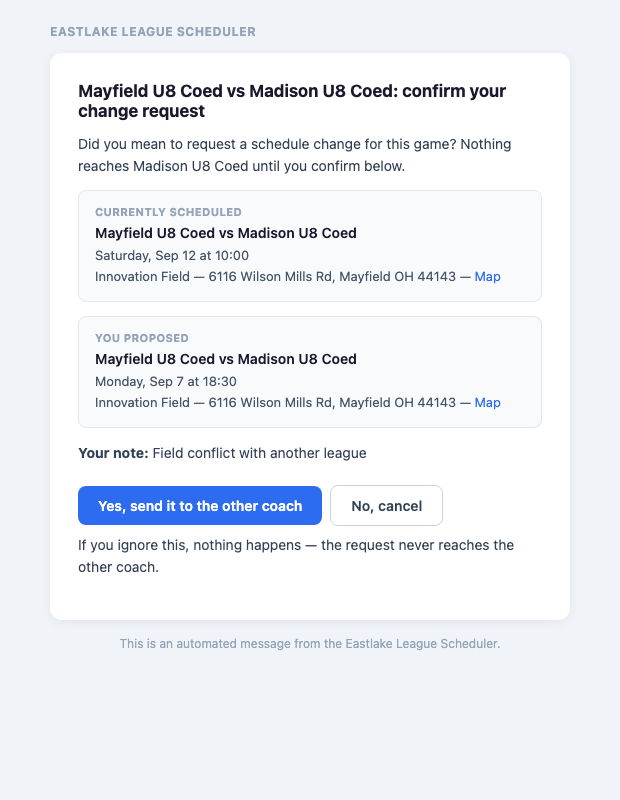
- We email you first to check you meant it. Nothing reaches the other coach until you confirm — so a mis-click costs nobody anything.
- The other coach gets your proposal with Approve and Suggest another time, plus your contact info in case it's easier to just talk it through.
- If they approve, the game moves and you're both told. Done.
- If it doesn't work for them, they pick a different time the same way and it comes back to you. That continues until one of you accepts.
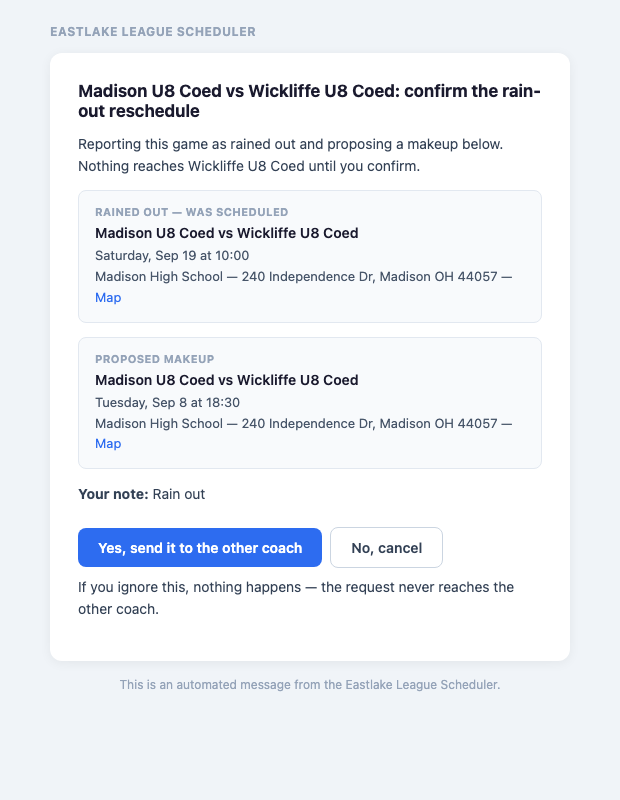
Check your own inbox first. Submitting the form doesn't send anything to the other coach yet — it sends a confirmation email to you. The change only goes out once you click Yes, send it to the other coach in that email. If you don't see it land, nothing has happened on the other end either.
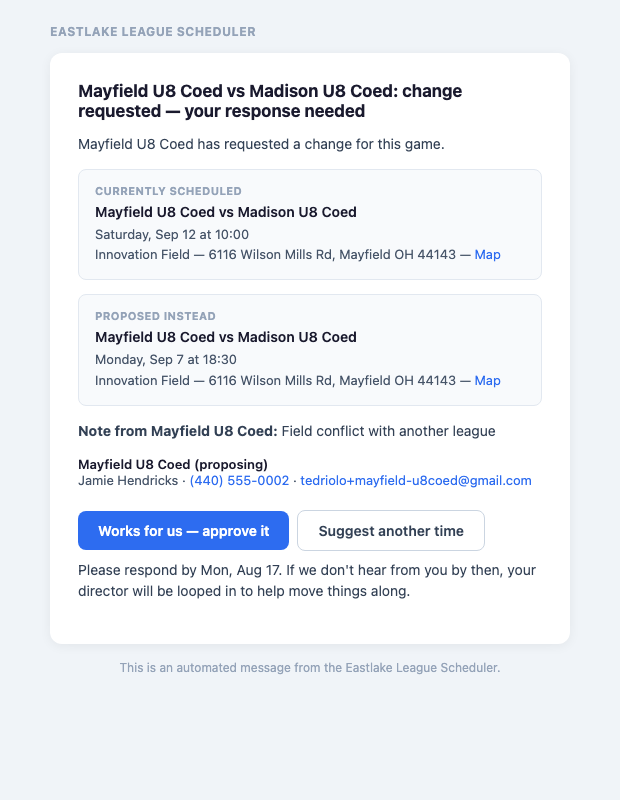
The game does not move until you both agree. It stays exactly where it is, flagged Negotiating, so nobody turns up at the wrong field mid-discussion.
Requesting a field-only change
Sometimes the date and time are fine and only the field needs to change — your regular field is closed for maintenance, say. Click Change Field on the game (next to Request Change) and pick the new field. This is a lighter process than a full reschedule: it's your call to make, not something the other coach has to approve — you're just required to let them know.
Only the home team can do this. The game is played at whoever's hosting, so the away coach doesn't see a Change Field button — if you're the away team and the field needs to change, ask the home team's coach or director.
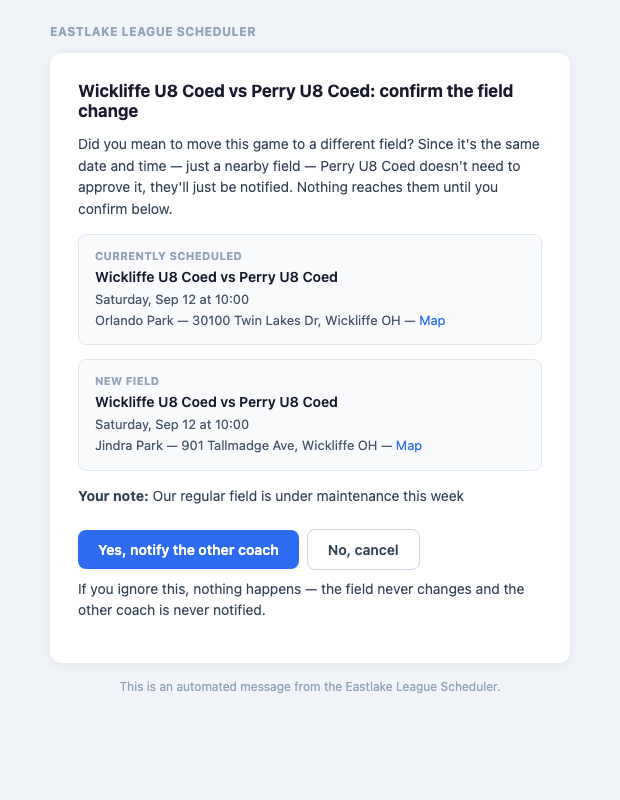
- Same as any change: we email you first to confirm you meant it.
- Once you confirm, the field changes immediately — there's no waiting on the other coach.
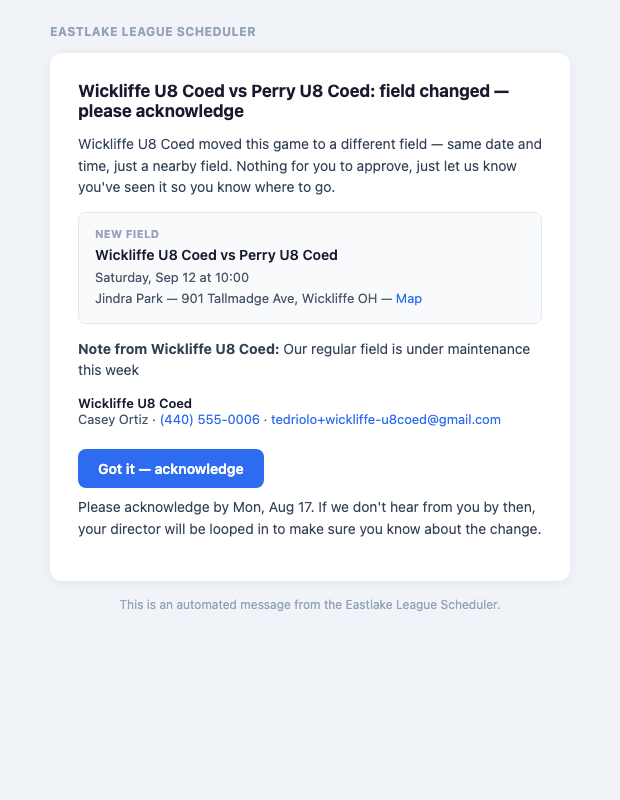
- The other coach gets a notice with the new field and a single Got it — acknowledge button, just so we know they've seen it. If they don't acknowledge in time, their director is looped in to make sure the message actually got through.
How long you have to reply
Every request email states the date you need to respond by. The window tightens as the conversation goes on, because by then you're both already engaged:
| First proposal | 3 days |
|---|---|
| Second | 2 days |
| Third onwards | 1 day |
Miss it and your director gets a nudge; keep missing it and the league admin hears. Nothing is cancelled — it just stops being only your problem.
Changes inside 7 days
Too close to the game for email back-and-forth. The tool shows you the other coach's phone number instead — call or text them, agree it directly, then record it with Manual Override. You'll be asked who you spoke to and how. That change applies immediately, and the other coach plus both directors are notified.
Rain out (or any weather cancellation)
Click Rain Out on the game instead of Request Change. It skips straight to picking a new day (there's no "just the time" option, since the whole day is out), then goes through the exact same back-and-forth as a normal change: the other coach approves or suggests a different makeup date, and it's not final until you both agree.
Only the home team can report a rain out. They're the ones with a makeup slot to find at one of their own fields, so the away coach doesn't see a Rain Out button — let the home team know and they'll start it.
The difference is what happens once you do agree: the original game is marked Rained Out and stays in the schedule as history, and a new game is created on the makeup date. Nothing is deleted — you can always see what the game originally was.
Same rule as any change: the makeup date isn't sent to the other coach until you confirm it in your own inbox first.
Reporting a score
Once a game's been played, either coach — or either team's director — can click Report Score and enter the final result. This isn't a negotiation like a change request: whoever gets there first enters it, and the other side can correct it if it's wrong, with a short note saying why. A freshly-entered score shows as reported; after about a week with no further correction it just reads as final — nothing you need to act on either way.
Every division's results feed a Standings tab on the public schedule page — wins, draws, losses, goal difference, and points, updated automatically as scores come in.
Seeing what happened
Click History on any game for the full record: who asked for what, when, who agreed, and anything that got escalated.
Stuck on something this guide doesn't cover? Coaches — ask your program director. Directors — ask the league admin.